browser_mod
A Home Assistant integration to turn your browser into a controllable entity - and also an audio player.
Example uses
- Make the camera feed from your front door pop up on the tablett in your kitchen when someone rings the doorbell.
- Have a message pop up on every screen in the house when it's bedtime.
- Make the browser on your workstation switch to a specific tab when the kitchen light is on after midnight
- Play a TTS message on your work computer when the trafic sensor tells you it's time to go home.
Installation instructions
NOTE: This integration required Home Assistant version 0.95 or later
-
Copy the contents of
custom_components/browser_commander/to<your config dir>/custom_components/browser_commander/. -
Add the following to your
configuration.yaml:
browser_commander:
- Restart Home Assistant
Usage
Devices
The most basic concept of browser_mod is the device.
A device is a machine-browser combination identified by a unique deviceID. The deviceID is randomly generated and may look like ded3b4dc-abedd098.
- Chrome on your desktop and Chrome on your laptor are two differnt devices.
- Chrome on your laptop and Safari on your laptop are two different devices.
- Two tabs in Firefox on the same computer is the same device.
- Two windows in Edge on the same computer is the same device.
In the two latter cases, the last loaded tab/window will be the active one.
Note: Incognito mode will generate a new deviceID and thus a new device every time it's started.
Aliases
Since the deviceID can be a bit hard to remember for devices you use often, you can specify an alias in configuration.yaml
browser_mod:
  devices:
    99980b13-dabc9563:
      name: Arrakis
    d2fc860c-16379d23:
      name: dashboard
This binds the aliases Arrakis to 99980b13-dabc9563 and dashboard to d2fc860c-16379d23.
Note: Aliases must be unique.
media_player
Once browser_mod is installed, loading up your Home Assistant frontend on a new device will create a new media_player device.
Any sound played on this media player will be played by the device.
The media_player entity also has some extra attributes presenting the current state of the device.
| attribute | content |
|---|---|
path |
The currently displayed path on the device. |
visibility |
Whether the frontend is currently visible on the device. |
userAgent |
The User Agent of the associated browser. |
currentUser |
The user currently logged in on the device. |
browser_mod.command service
Call the browser_mod.command service to controll your device in various ways.
All service calls have two parameters in common, command which is the command to execute, and deviceID which is a list of devices to execute the command on. If deviceID is ommitted, the command will be executed on all currently connected devices.
deviceID may also contain aliases, and there's a special alias named this which will evaluate to the device from which a command was initiated (if from the frontend).
set-theme
service: browser_mod.command
service_data:
  command: set-theme
  theme: clear_light
will set the current theme to clear_light on all devices.
navigate
service: browser_mod.command
service_data:
  command: navigate
  navigation_path: /lovelace/1
  deviceID:
    - ded3b4dc-abedd098
will open your second lovelace view on just the device ded3b4dc-abedd098.
Note: navigation_path does not have to be a lovelace path. All paths in Home Assistant works.
more-info
service: browser_mod.command
service_data:
  command: more-info
  entity_id: camera.front_door
  deviceID:
    - ded3b4dc-abedd098
    - dashboard
will show the more-info dialog of camera.front_door on the devices ded3b4dc-abedd098 and dashboard.
The optional parameter large: true will make the popup wider.
popup
service: browser_mod.command
service_data:
  command: popup
  title: Popup example
  card:
    type: entities
    entities:
      - light.bed_light
      - light.kitchen_lights
      - light.ceiling_lights
  deviceID:
    - this
will display the specified entities card as a popup on the current device.
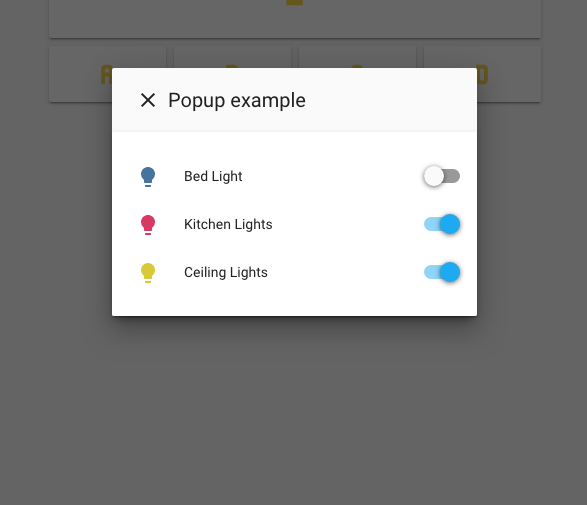
The optional parameter large: true will make the popup wider.
The optional parameter style: will apply css style options to the popup.
Ex:
  style:
    border-radius: 20px
    --ha-card-border-radius: 20px
    --ha-card-background: red
Note: Sometimes this doesn't work if the device is not currently displaying a lovelace path. I'm looking into that...
close-popup
service: browser_mod.command
service_data:
  command: close-popup
will close all more-info dialogs and popups that are open on all connected devices.
browser-player card
To control the playback in the current device, browser_mod includes a custom lovelace card. Just add
type: custom:browser-player
anywhere in your lovelace configuration.
The player card also displays the entityID. Click it to select, so you can copy it.

FAQ
Does this replace lovelace-player and lovelace-browser-commander
Yes.
Some improvements
- With the backend support
browser_moddoes the same things as both of those, but better. - Since
browser_moduses a service for executing commands rather than events, the commands can be easily triggered by any lovelace element which has atap_actionsetting. This actually means it pretty much replacespopup-cardas well. browser_moduses websockets to get immediate feedback from the device to the backend and much better tracking of disconnects.- Aliases. 'nuff said.
browser_modworks outside of/lovelace.- This works even if the currently logged in user is not in the admin group.
Does this replace lovelace-fullykiosk
It will, eventually.